Colouring Pages Maker
Pick a design type and press New design: a fresh printable coloring page every time, ready to print or color online.
Recent
Your last 10 settings, saved only in this browser. Nothing is uploaded.
Popular tools
- Animal Coloring Pages MakerPick an animal or let the page surprise you, add a farm, ocean or jungle backdrop, then print or save a PDF.
- Flower Coloring Pages MakerChoose a rose, sunflower, bouquet or any of the flowers, switch on extra detail for older colorists, and print.
- Car Coloring Pages MakerPick a car, race car, monster truck, fire truck or another vehicle, put it on a road backdrop, and print.
How to make and print a coloring page
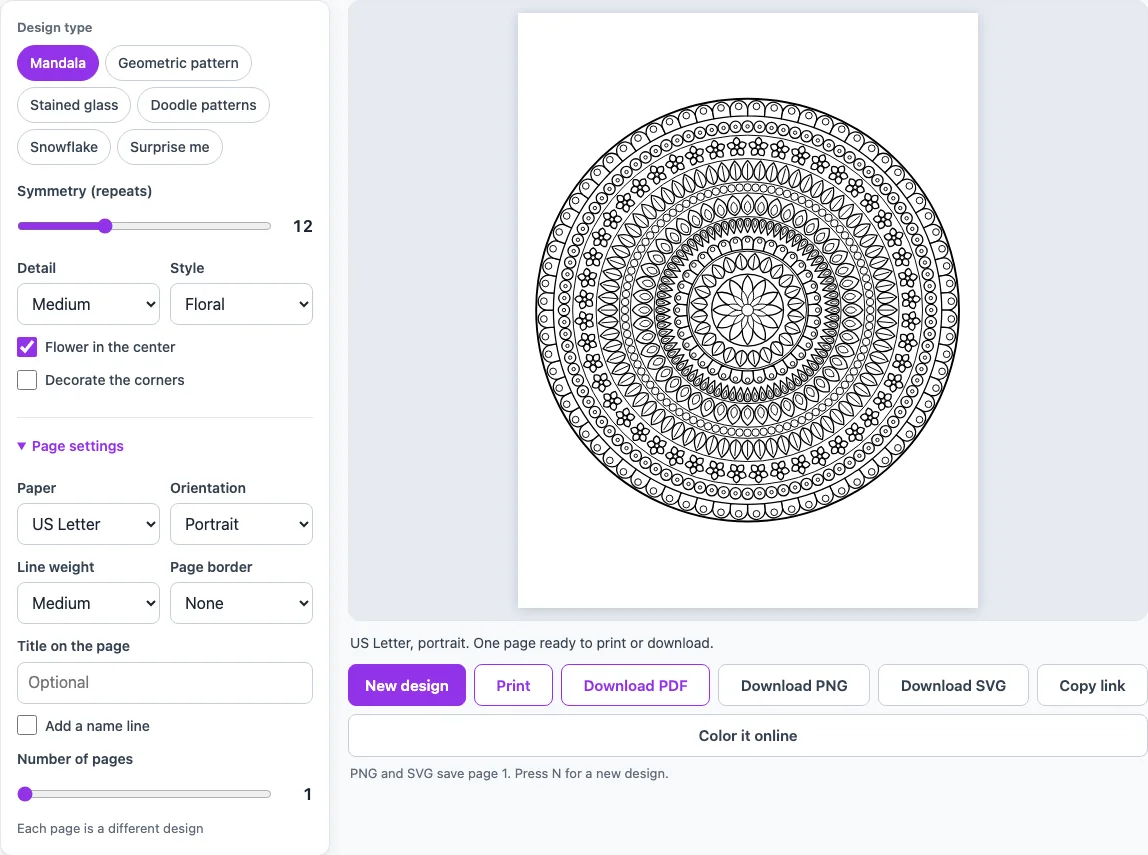
- Choose a design type in the quick coloring page maker on this page. Mandala is the default. You can also pick Geometric pattern, Stained glass, Doodle patterns, Snowflake or “Surprise me.”
- Open Page settings. Set Paper to US Letter or A4.
- Set Orientation to Portrait or Landscape.
- Set Line weight to Thick for young children and markers, or Thin for colored pencils and fine detail.
- Optional: pick a Page border, turn on Title on the page, or turn on Add a name line.
- Set Number of pages from 1 to 30 if you want a set.
- Press New design (or the N key) until you see a picture you like.
- Press Print. Only the picture pages print, one picture per sheet.
Each design type has its own options next to the preview; Mandala, for example, lets you set the symmetry, the detail and the style. For a whole page of options for one design type, open its own tool from the directory below.
For a file instead of a printout, use Download PDF (all pages in one vector PDF), Download PNG (page 1 as an image) or Download SVG (page 1 as a vector file). Copy link gives you an address that opens the same picture again, and Color it online opens it in the online coloring tool.
Everything you make here is free to use in class or in products you sell, such as coloring books on KDP or printables on Etsy.
Are the coloring pages free to use?
Yes. The tool is free, and every picture is drawn by the site’s own code when you press a button. Nothing is copied from an image collection, so there is no stock picture to search for or download first. Each page is created on the spot, which is why you can keep pressing “New design” until you find one you like.
Do I need to sign up or install anything?
No. The tool runs in your web browser, so you do not install software or create an account. Nothing you make is uploaded or sent to a server. Your settings and pictures stay on your device while you work.
Which pages suit young children and which suit adults?
Young children do best with thick outlines and big, simple shapes. Use the Easy detail level, Thick line weight, and the alphabet, number and big-shape pages. Adults can use Hard mandalas, small doodle patterns, many stained glass pieces and thin lines. Thin lines give room for small, careful coloring with colored pencils.
Can I color online instead of printing?
Yes. The “Color it online” button opens the same picture in the site’s online coloring tool, so you can color on screen without printing anything. You can also use the Color it online page from the list of related tools below.
Can I make a whole coloring book?
Yes. Set Number of pages from 1 to 30, and each page will be a different design. Use Download PDF to save all the pages in one file, which keeps the lines sharp at any size. Add a title or a name line if you want the set to look like a booklet of your own.
How do I print a coloring page?
Start with the paper size and line weight, because these matter most for a printout. Choose the paper your printer holds, then pick Thick lines for markers or Thin lines for colored pencils. Every closed shape has a white inside, so any space can be colored, and the line weight decides how easily you can see the edges while you color.
Frequently asked questions
Why do the lines look faint on my printout?
Try Thick line weight. Thin outlines are about 0.35 mm wide, so they can look pale on some printers, while thick outlines are about 1 mm.
Should I pick US Letter or A4?
Pick the size your printer uses. The paper setting changes the page size, so choose it before you press Print or download.
Will every picture be different?
Each press of “New design” makes a unique picture. There is no fixed gallery, so you will not see the same drawing again unless you save its link.
What is the difference between PDF, PNG and SVG?
PDF saves all your pages in one file with sharp lines at any size. PNG saves page 1 as an image, and SVG saves page 1 as a vector file that can be scaled without losing quality.
Do I need drawing skills to use these pages?
No. You only color inside the shapes, so the pictures are ready to fill in. Pick Easy detail for a simpler design.
Can I add words to a page?
Yes. Turn on “Title on the page” to add optional text in big outline letters at the top. This works well for a child’s name or a theme.
Can I use the coloring pages I make for commercial purposes?
Yes. Everything you make here is royalty-free for personal, classroom and commercial use, and no credit is required. That includes Amazon KDP coloring books, Etsy printables, Teachers Pay Teachers resources and print-on-demand products. The pictures are the site’s own original drawings, not licensed characters or brands. The only limit is that you may not copy our generator or site to run a competing service; see the terms.
Related tools
- Coloring page generator: use it to make new designs with more detailed controls.
- Mandala coloring pages: use it when you want round, repeating patterns for relaxed coloring.
- Color by number printables: use it when you want a numbered picture with an answer key.
- Photo to coloring page converter: use it to turn your own photo into a coloring page.
- Color online: use it when you want to color on screen without printing.
- Christmas coloring pages: use it for festive pictures in December.
- Alphabet coloring pages: use it for letter practice with young children.
- Word and name coloring pages: use it to make a page that spells out a word or a name.
- Animal coloring pages: use this for cute animals on a farm, ocean or jungle backdrop.
- Easy coloring pages for kids: use this for big, simple pictures with thick lines for ages 3 to 6.