Flag Coloring Pages Maker
Pick a country and print its flag as a blank outline, drawn to its real proportions. Add a color guide, or print six flags to a page.
Recent
Your last 10 settings, saved only in this browser. Nothing is uploaded.
How to use the flag coloring page maker
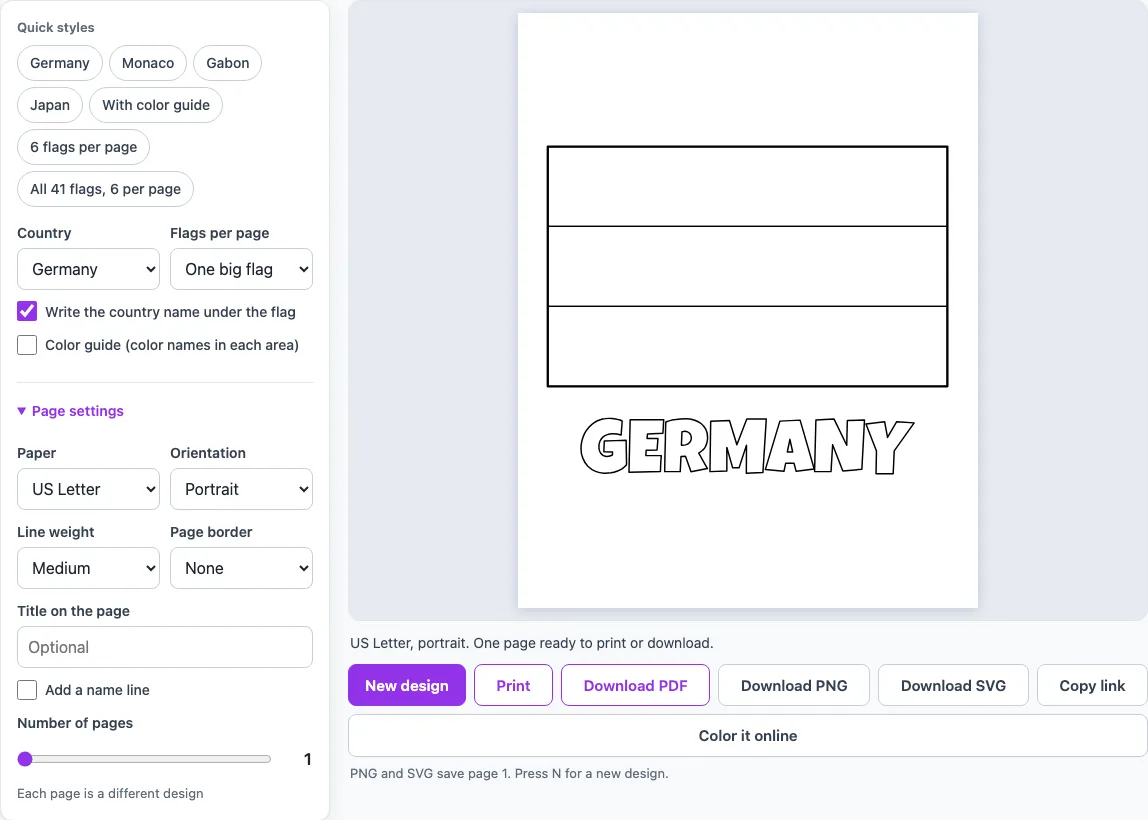
- Open the Country menu and pick a flag. It starts on Germany. You can also choose “Surprise me” or “All flags (one page each)”.
- Set Flags per page to One big flag or 6 flags. The six-flag layout shows the chosen flag and the next five in alphabetical order.
- Turn Write the country name under the flag on or off. The name is printed in outline letters you can color.
- Turn on Color guide if you want color names printed inside each area, plus a line such as “Colors: black, red, gold.” under the flag.
- Click a quick style chip, such as Germany, Monaco, Gabon, Japan, or “All 41 flags, 6 per page”, to jump to a ready setup.
- Adjust the page settings if needed: Paper (US Letter or A4), Orientation, Line weight (Thin, Medium or Thick), Page border, Title on the page, Add a name line and Number of pages.
- Click Print, or click Download PDF to save a file you can print later.
Download PNG and Download SVG save page 1 only, so use PDF or Print for a multi-page pack. Copy link gives you a link to the current design. New design only changes the page when Country is set to Surprise me, which picks other flags; with a flag chosen, the page stays the same.
What does the blank flag of Germany look like?
The blank flag of Germany is a horizontal tricolour of three equal bands, with black on top, red in the middle and gold at the bottom. The tool draws it at the real proportion of 3:5, height to width, so the page shows three empty bands ready to color. Because the bands are equal in height, each one is easy to fill in evenly. Turn on the color guide if you want the names black, red and gold printed inside the matching bands.
Monaco flag coloring page: how is it different from Indonesia?
Monaco and Indonesia use the same two colors in the same order, with red on top and white below. The difference is the shape. Monaco’s flag has a proportion of 4:5, height to width, so it is closer to a square. Indonesia’s flag has a proportion of 2:3, so it is longer and thinner. The tool draws each one in its own shape, so printing them side by side shows the difference clearly.
Which flags can I print?
The tool includes 41 flags, all made only of plain bands, crosses and discs. The set has vertical tricolours such as France, Italy, Ireland and Belgium, horizontal bands such as Germany, Monaco, Gabon, Colombia and Latvia, and Nordic crosses such as Sweden, Finland, Denmark, Norway and Iceland. It also includes Switzerland’s square flag, the discs of Japan, Bangladesh and Palau, and Laos. Flags with a coat of arms, stars, a sun or other emblems are not included, such as Mexico, the United States, India or Canada. A drawing of those would not be exact, so the tool does not offer them as flags coloring pages. The Country menu lists all 41 flags in alphabetical order.
How do I know which colors to use?
Turn on Color guide to see the color names. The tool writes the name inside every area large enough to hold it. On a one-big-flag page, it also prints a line such as “Colors: black, red, gold.” and a sentence such as “From top to bottom: black, red, gold.” that says which color goes where. With six flags per page, only the names inside the areas are printed. The names are plain color names, not exact color codes, so match them to the crayons or pencils you have. On the Gabon flag coloring page, the middle band is named “yellow,” which is the gold band of the flag.
Can I print several flags on one page?
Yes. Set Flags per page to 6 flags to place six flags with their names on one page. Each sheet shows the chosen flag and the next five in alphabetical order. For the full set, use the “All 41 flags, 6 per page” chip, which makes a 7-page pack where each page shows the next six flags. If you want one flag per page instead, choose “All flags (one page each)” in the Country menu.
Is anything uploaded and is it free?
Yes, the tool is free, and nothing is uploaded. It draws the outline in your browser, so there is no account to create and no sign-up step. You choose the flag and settings, print or download the result, and the page is ready to use straight away.
Frequently asked questions
What colors does the Gabon flag coloring page use?
Gabon’s flag is a horizontal triband of green, gold and blue, with three equal bands and a proportion of 3:4, height to width. The tool draws three empty bands in that shape. With the color guide on, the middle band is named “yellow”, which stands for the gold of the flag.
Where do the flag proportions come from?
The proportions and layouts follow Wikipedia’s “Flag of …” article for each country, read through the MediaWiki API on 18 October 2026. The tool draws outlines only. For a precise design, check the official specification for that flag.
Can I color the flag on screen instead of printing it?
Yes. Click “Color it online” to open the same flag in the on-screen coloring page. You can use it without printing anything.
Why are some well-known flags missing?
Flags with a coat of arms, stars, a sun or other emblems are not included, for example Mexico, the United States, India or Canada. The tool only draws flags made of plain bands, crosses and discs, so each outline can be drawn accurately.
How can I make the outlines easier to color?
Set Line weight to Thick for bolder outlines, or Thin for finer ones. You can also add a Page border, which is available as None, Line, Rounded or Double.
Can I add a title or a name line to the page?
Yes. Type a title in Title on the page, and tick Add a name line to print a line for a name. Both are page settings and both are optional.
Which file should I download for a multi-page pack?
Use Print or Download PDF for a multi-page pack. Download PNG and Download SVG save only page 1.
Can I use what I make with the flag coloring pages commercially?
Yes. Everything you make here is royalty-free for personal, classroom and commercial use, including KDP books, Etsy printables and Teachers Pay Teachers. No credit is required. The only thing you may not do is copy the generator or the site itself to run a competing service; see the terms.
- Animal Coloring Pages Maker: pick an animal or let the page surprise you, add a backdrop, then print or save a PDF.
- Car Coloring Pages Maker: pick a car, race car, monster truck or fire truck and print it on a road backdrop.
- Dinosaur Coloring Pages Maker: pick a T. rex, triceratops or stegosaurus, add a volcano backdrop or six to a page.
- Free Coloring Pages for Kids: big, simple pictures with thick lines for small hands, one or four to a page.
- ABC Coloring Pages: choose a letter or the whole alphabet, each page with a big outline letter and a picture.
- Color by Number Print & Play: numbered pictures with a color guide, to print or color on screen.
- Space Coloring Pages Maker: the solar system, one big planet or a rocket scene to print.