Rainbow Coloring Page Maker
Choose how many bands, add clouds, a sun, hills or a second rainbow, and print a new rainbow page every time you press New design.
Recent
Your last 10 settings, saved only in this browser. Nothing is uploaded.
The Rainbow Coloring Page Maker is a free tool that draws a printable rainbow coloring page right in your browser. Each press of New design draws a different rainbow, so you can pick the one you like best before you print. It needs no account and nothing is uploaded.
You choose how many bands the rainbow has, from 3 to 8, and which scene to draw, with a sun, clouds, hills, or two arches. Dots, waves and zigzags can fill the bands, and stars, hearts or dots can fill the sky. Each band is a closed outline, so a young child can color one stripe at a time. You can print the page directly or download it as a PDF, PNG or SVG file.
Use it for one rainbow coloring sheet, a set of printable rainbow coloring pages for a class, or a pack of six different designs in one file.
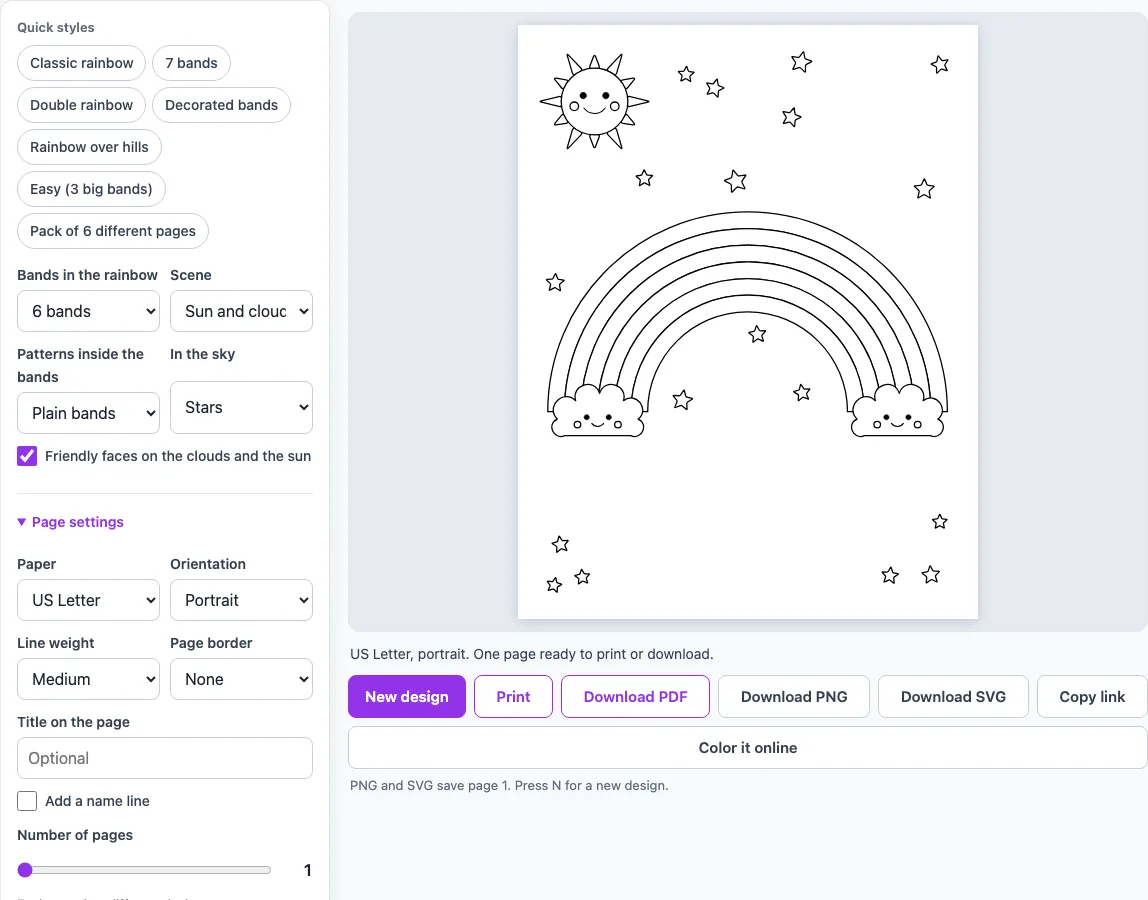
How to use the Rainbow Coloring Page Maker
- Open the tool. It starts with a six-band rainbow, a sun and clouds, plain bands and stars.
- Set Bands in the rainbow to the number you want. Choose 3 for big areas or 8 for narrow ones.
- Pick a Scene: Sun and clouds, Clouds, Sun and hills, or Double.
- Under Patterns inside the bands, choose Plain bands, Dots, Waves, Zigzags, or Mixed for a different pattern in each band.
- Under In the sky, choose Stars, Hearts, Dots, or Nothing.
- Tick or untick Friendly faces on the clouds and the sun.
- Set the page options: Paper (US Letter or A4), Orientation, Line weight, Page border, a title, and an optional name line.
- Press New design until you see a page you like.
- Press Print, or press Download PDF and print the file later.
The quick style chips give you a starting point in one click. Easy (3 big bands) suits small children, and Pack of 6 different pages makes six different rainbows in one PDF. Use Number of pages to make several designs at once, each with its own layout. You can also download a PNG or SVG file, or press Color it online to color on screen.
How do I make a rainbow coloring page?
A rainbow coloring page is a set of closed shapes arranged in arches, so every color area has a clear edge. This tool draws each band as its own closed outline with a blank inside. That means each band can be colored on its own, without the color spilling into the next one.
The rainbow takes most of the page width, which leaves room for the scene and the sky decorations. Pattern lines such as dots, waves and zigzags sit inside a band. You can color around them or leave them white. Stars, hearts and dots are placed in the empty parts of the page, under and around the arch and inside its hollow. They never touch the rainbow, clouds or sun, so no shape is cut in two.
How many bands should a rainbow have?
Many people color a rainbow with seven bands: red, orange, yellow, green, blue, indigo and violet. That is a common suggestion, not a rule of the page, so any number from 3 to 8 works.
The number of bands sets the width of each stripe. Three bands give big areas that suit small children. Eight bands give narrow areas that suit older kids and adults. Patterns need wider bands to be easy to color, so for young children, use 3 to 5 bands when you add patterns. The default of six sits between the two ends of the range.
Can I make a double rainbow coloring page?
Yes. Set Scene to Double, or press the Double rainbow quick style. The main rainbow uses the number of bands you chose. A thinner second arch sits around it with a gap between the two, and it has two fewer bands than the main rainbow.
For example, a 7-band main rainbow gets a 5-band outer arch. The outer arch never has fewer than 3 bands, so a 4-band main rainbow gives a 3-band outer arch rather than 2.
Is it free to print and can I use it commercially?
Yes, the tool is free and needs no account. The pictures are drawn by the site’s own code and are not copied from anywhere. Everything you make here can be used for personal, classroom and commercial purposes.
To print, press Print for one page, or press Download PDF and print the file. The PDF can hold several pages, each with its own design.
Frequently asked questions
Do I need an account to make a rainbow coloring page?
No. The tool runs in your browser, needs no sign-up, and nothing you make is uploaded.
Can I make several different rainbow pages at once?
Yes. Set Number of pages to make more than one design, each with its own layout, all in one PDF. Pack of 6 different pages gives you six designs in a single click.
Can my child color the rainbow on screen?
Yes. Press Color it online to color the page in the browser, or print it and use crayons or markers.
Can I remove the stars and hearts?
Yes. Set In the sky to Nothing to leave the sky empty.
Which paper sizes can I choose?
You can choose US Letter or A4, in portrait or landscape orientation.
Will the pattern lines make the bands hard to color?
They can. Color around the pattern lines, leave them white, or choose Plain bands for an easier page.
Why does my rainbow look different each time?
Each press of New design draws a new page with new placements for the sky decorations. Keep pressing until you find a layout you like.
Can I use what I make with the rainbow coloring pages commercially?
Yes. Everything you make here is royalty-free for personal, classroom and commercial use, including KDP books, Etsy printables and Teachers Pay Teachers. No credit is required. The only thing you may not do is copy the generator or the site itself to run a competing service; see the terms.
- Mandala Coloring Pages: symmetric mandalas with the number of petals, rings and detail you choose.
- Geometric Coloring Pages: shapes and repeating patterns with clean lines.
- Doodle Coloring Pages: loose, hand-drawn style doodles to fill with color.
- Stained Glass Coloring Pages: bold outlines that look like glass panels.
- Free Coloring Pages for Kids: big, simple pictures with thick lines for small hands.
- Easter Coloring Pages: an Easter egg designer and bunny, chick and basket pictures.
- Color by Number Print & Play: numbered pictures with a color guide, to print or color on screen.