Space Coloring Pages Maker
Print the whole solar system in order, one big planet with its name, or a rocket scene with planets and stars.
Recent
Your last 10 settings, saved only in this browser. Nothing is uploaded.
How to use the Space Coloring Page Maker
- Open the Picture menu and choose The solar system, One big planet or Rocket scene. You can also click a Quick style chip, such as Solar system, Saturn or Rocket scene.
- If you chose One big planet, pick a body in Planet. Mercury, Venus, Earth, Mars, Jupiter, Saturn, Uranus, Neptune, the Sun and the Moon are all listed. This setting does nothing for the other pictures.
- Turn Write the names on or off. When it is on, names appear under each drawing, or in outline letters under the big planet.
- Turn Stars in the sky on or off to add or remove the stars around the planet and rocket pictures.
- Set Paper (US Letter or A4), Orientation (portrait or landscape), Line weight (Thin, Medium or Thick) and Page border (None, Line, Rounded or Double).
- Add a Title on the page or an Add a name line if you want them. Set Number of pages when you print a set.
- Click New design to move the stars on a planet page or to get a new rocket scene. The solar system page stays the same.
- Click Print, or use Download PDF, Download PNG or Download SVG. Use Copy link to share the page with your settings.
For a full set, select the Quick style chip All planets, one per page. It makes a 10-page pack. Color it online opens the same picture as an on-screen coloring page.
What is in the solar system coloring page?
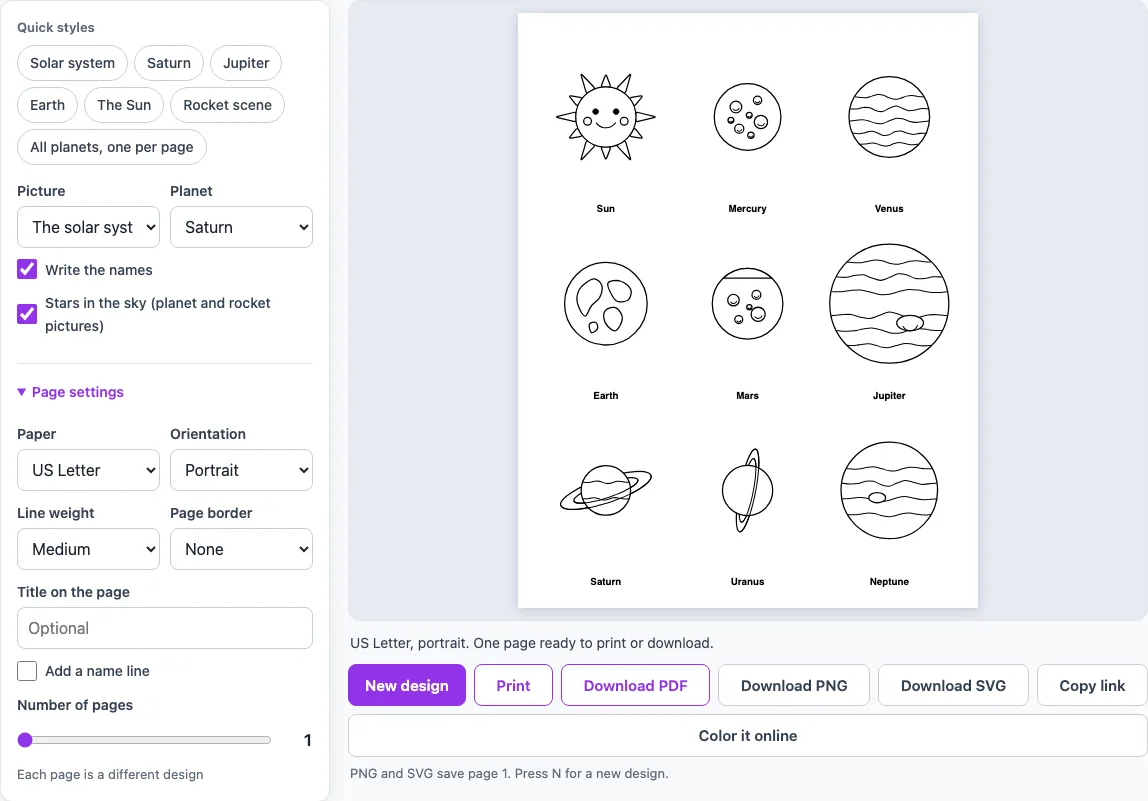
The solar system coloring page has nine drawings in three rows of three: the Sun, Mercury and Venus in the first row; Earth, Mars and Jupiter in the second; and Saturn, Uranus and Neptune in the third. With Write the names on, each name is printed under its drawing.
The drawings use simple features. Mercury and Mars have craters. Venus has swirling cloud lines. Earth has stylised continent shapes, which are not an accurate map. Jupiter has stripes and an oval Great Red Spot. Saturn has a large ring, and Uranus has a ring that sits almost upright. Neptune has bands and a spot. The Sun has rays and a friendly face.
The planets follow the order NASA gives from the Sun: Mercury, Venus, Earth, Mars, Jupiter, Saturn, Uranus and Neptune. Jupiter and Saturn are gas giants, and Uranus and Neptune are ice giants.
Which planets have rings in the drawings?
Saturn and Uranus. NASA describes Saturn as surrounded by a ring system and Uranus as surrounded by 13 faint rings; NASA also says Uranus rotates at nearly a right angle to its orbit, which makes it appear to spin sideways. That is why the ring on the Uranus drawing is nearly upright, while Saturn’s ring is tilted only a little. Rings on other planets are not drawn.
Are the planets drawn to scale?
No. The drawings are not to scale, but they keep the real order of size. NASA’s planets overview lists Jupiter as the largest planet, followed by Saturn, Uranus, Neptune, Earth, Venus and Mars. Mercury, the planet nearest the Sun, is the smallest.
Bigger planets are drawn bigger on the page, but even Mercury is large enough to color. The page shows which planet is larger, not how far apart they really are or how many times wider one is than another. Jupiter’s Great Red Spot is drawn as a simple oval, which is a simplified version of the swirling cloud NASA describes as about twice as wide as Earth.
Frequently asked questions
Is the Space Coloring Page Maker free to use?
Yes. It is a free tool that runs in your browser. You do not need an account, and nothing you make is uploaded.
How do I print one planet?
Set Picture to One big planet, then choose a body in Planet. Set Paper and Orientation, then click Print. The planet fills the page with its name in outline letters underneath.
Can I print a pack with every planet?
Yes. Click the Quick style chip All planets, one per page, or choose All ten (one per page) in Planet with Number of pages set to 10. You get one page per body in this order: Mercury, Venus, Earth, Mars, Jupiter, Saturn, Uranus, Neptune, the Sun and the Moon.
Does it include galaxies, comets, astronauts or space stations?
No. The tool covers the solar system, the planets, the Sun, the Moon and a rocket scene. Galaxies, comets, astronauts and space stations are not drawn yet.
What does New design change?
In the rocket scene, New design changes which two planets appear in the corners, moves things a little and flips the direction the rocket points. Each click gives you a new layout of the same scene.
Can I color the page without printing it?
Yes. Click Color it online to open the same picture as an on-screen coloring page. You can also download a PNG or PDF if you want a printed copy later.
Can I use what I make with the space coloring pages commercially?
Yes. Everything you make here is royalty-free for personal, classroom and commercial use, including KDP books, Etsy printables and Teachers Pay Teachers. No credit is required. The only thing you may not do is copy the generator or the site itself to run a competing service; see the terms.
- Animal Coloring Pages Maker: pick an animal or let the page surprise you, add a backdrop, then print or save a PDF.
- Car Coloring Pages Maker: pick a car, race car, monster truck or fire truck and print it on a road backdrop.
- Dinosaur Coloring Pages Maker: pick a T. rex, triceratops or stegosaurus, add a volcano backdrop or six to a page.
- Free Coloring Pages for Kids: big, simple pictures with thick lines for small hands, one or four to a page.
- ABC Coloring Pages: choose a letter or the whole alphabet, each page with a big outline letter and a picture.
- Flag Coloring Pages Maker: blank outlines of 41 flags drawn to their real proportions.
- Number Coloring Pages: choose a number or a 1-10 pack with ten-frames of pictures to count.